
Open DNS
By cipher

The Domain Name System (DNS) is a hierarchical naming system for computers,
services, or any resource connected to the Internet.
The names of web sites you load into your browser are called URLs
like the one for this web site. URLs contain Domain Names.
This Name is human readable and easy to understand.
It refers to an IP address where the machine you wish to connect to resides.
A DNS Name Server translates this URL into an IP address so your computer
can find the computer with the web pages you wish to see.
When you sign up with an Internet Service Provider, they give you, or install
for you, DNS name server information to make this happen.
As with anything, these Names need to be updated regularly. Some DNS Name
servers are better than others.
I have found Open DNS to be a very fine primary Name Server, and use my ISP's
Name Server as secondary.
After you visit the Open DNS web site, and register for free, you can use their Name Servers yourself.
After getting the DNS numbers do this:
Left click your Network Icon on your desktop. It will be in the upper left corner near My Computer
Drag mouse to Properties, click to open.
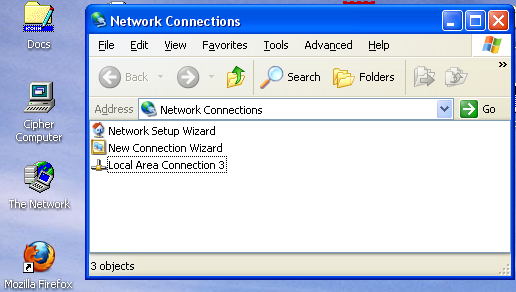
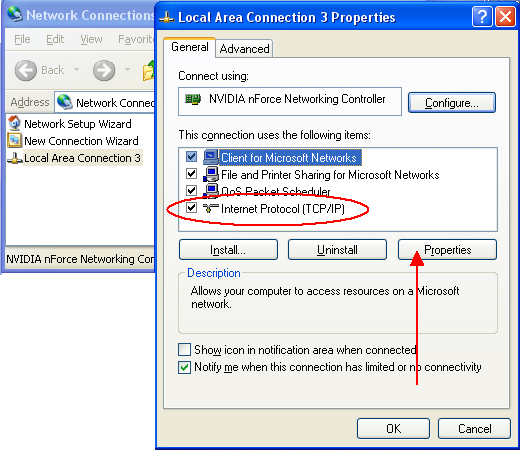
Right click your Local Area Connection, and drag to Properties.
Click to Highlight Internet Protocol[TCP/IP]
Click Properties
Make the changes as below.
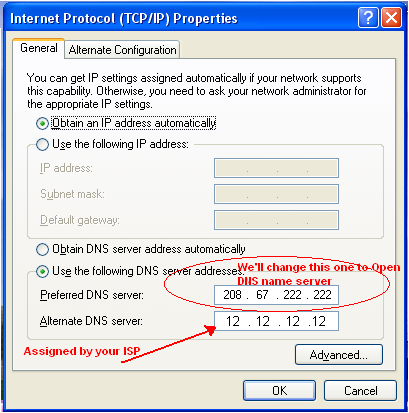
You can always go back and change these settings when you like.
I have found the free for home use Open DNS to be great, and would
like to thank them for making this available. Many corporation, like say the
Atlanta Braves Baseball Team, pay them to provide DNS services.
